0 ratings




Artikelnr.:
219460246
Mac mini M4 2TB SSD Hard Disk Upgrade DIY | SSD Upgrade for Mac mini M4, 3300MB/s High Speed, Easy Installation, Reliable Storage
Artikelnr.:
219460246
€ 472
Price Details
Ohne Versand- und Zollkosten ( Versand- und Zollkosten werden an der Kasse berechnet )
*Alle Artikel werden aus USA importiert
Auf Lager
 Vom USA Store für Sie importiert
QTY:
Nur noch 8 Artikel auf Lager.
Bestellen Sie jetzt und erhalten Sie es am Donnerstag, September 17
Gesicherte Transaktion
Ubuy ist bestrebt, Ihre Sicherheit und Privatsphäre zu schützen. Unser fortschrittliches Zahlungssicherheitssystem gewährleistet Vertraulichkeit, indem Ihre Daten während der Übertragung mit AES (Advanced Encryption Standards) und SSL (Secure Socket Layer) Protokollen verschlüsselt werden. Ihre Zahlungsdaten sind 100% sicher, da wir Ihre Zahlungsdaten nicht an Drittanbieter weitergeben.
Unsere besten Logistigpartner


Engineered exclusively for Mac Mini M4, this SSD quadruples your storage capacity to effortlessly house large media libraries, professional-grade applications.

Fast
Shipping

Kostenlose
Rücksendung*

Sichere Verpackung

100 % Originalprodukte

PCI DSS-Standards

ISO 27001-zertifiziert





Note: Step Down Voltage Transformer required for using electronics products of USA store (110-120). Recommended power converters Jetzt kaufen.


Besondere Merkmale
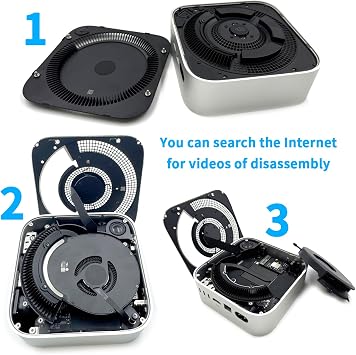
Easy Installation
This DIY kit simplifies the hard disk upgrade process, allowing users to effortlessly enhance their Mac mini's storage without professional assistance, saving both time and money.
1TB Storage
Offering a spacious 1TB SSD, this upgrade significantly boosts file storage capacity, enabling users to store large applications, media, and files without worrying about running out of space.
High Performance
The M4 SSD enhances device performance, reducing load times and increasing data transfer speeds. Users can enjoy a more responsive system for demanding applications and multitasking.
Produktdetails
| Hardware Interface | eSATA |
| Hardware Platform | x86_64 |
| Memory Storage Capacity | 2 TB |
| Compatible Devices | Mac mini M4 |
| Supported Devices Quantity | 4 |
| Data Transfer Rate | 3300 megabits_per_second |
| Connectivity Technology | SATA |
| Color | M4-2TB |
| Enclosure Material | Aluminum |
| Item Weight | 0.02 kg |
| Brand | sbaceflay |
| Unit Count | 1 Count |
| Number of Items | 1 |
| Manufacturer | sbaceflay |
| UPC | 726899873371 |
| Built-In Media | Installation Guide |
| Model Number | M-2 |
| Mfr Part Number | M4-2TB |
| Material | Aluminum |
Lieferumfang
Installation Guide
Für wen ist das Produkt geeignet?

-
Tech Enthusiasts
Users who enjoy upgrading their hardware will appreciate the flexibility of a DIY SSD installation.
-
Content Creators
Photographers and video editors will benefit from increased speed and capacity for storing large files.
-
Budget-Conscious Users
Those looking to enhance their Mac mini's performance without purchasing a new model will find this upgrade viable.

-
Non-Technical Users
Individuals unfamiliar with hardware upgrades may struggle with the installation process and require professional help.
PRODUKTBESCHREIBUNG
Haben Sie eine Frage? Mit uns chatten
Kundenfragen und -antworten
-
Frage:
What is included in the Mac mini M4 SSD 1TB Hard Disk Upgrade DIY Kit?
Antworten: The Mac mini M4 SSD 1TB Hard Disk Upgrade DIY Kit typically includes a 1TB SSD, installation tools, and a detailed instruction manual. This comprehensive kit is designed to provide everything you need for a smooth upgrade process, making it perfect for tech enthusiasts and beginners alike. The included tools are specifically chosen to assist with the Mac mini's unique build, ensuring a secure installation. Whether you are looking to increase storage for demanding applications, improve system speed, or simply back up your data, this kit serves as a reliable solution. -
Frage:
Is the installation process for the Mac mini M4 SSD 1TB difficult?
Antworten: The installation process for the Mac mini M4 SSD 1TB is manageable for those with basic technical skills. The kit comes with an instructional manual that guides users step-by-step through the upgrade. Clear visual aids and detailed instructions help demystify the process, making it accessible for most users. If you are comfortable with small electronics and have a steady hand, this DIY kit is a fantastic way to enhance your Mac mini's performance without needing professional assistance. -
Frage:
What are the performance benefits of upgrading to a 1TB SSD?
Antworten: Upgrading to a 1TB SSD significantly enhances performance by providing faster read and write speeds compared to traditional hard drives. Users will experience quicker boot times, faster file transfers, and improved application loading. This upgrade is ideal for anyone using resource-intensive applications such as video editing software or large databases. The additional storage capacity also allows for keeping extensive libraries of photos, videos, and music without compromising speed. -
Frage:
Can I use the Mac mini M4 SSD kit with other models?
Antworten: The Mac mini M4 SSD 1TB Hard Disk Upgrade DIY Kit is specifically designed for certain models of the Mac mini. It is crucial to check compatibility through the product specifications or your Mac's model number before purchase. If you have a compatible model, you can expect seamless installation and optimal performance. For other models, be sure to look for SSD upgrade kits tailored to their design and specifications to ensure a successful upgrade. -
Frage:
How do I back up my data before upgrading the SSD?
Antworten: Backing up your data before upgrading to a new SSD is a crucial step to ensure that none of your important files are lost. You can utilize Time Machine, Apple's built-in backup feature, to create a complete backup of your system. Alternatively, you can manually back up files to an external drive or cloud storage. This way, you not only protect your data but also have a clean slate for the new installation, enabling you to take full advantage of your upgraded system. -
Frage:
What tools are required for the installation?
Antworten: The installation of the Mac mini M4 SSD typically requires basic tools such as a Torx screwdriver and a prying tool, which are usually included in the DIY kit. These tools are essential for safely opening the Mac mini and accessing the internal components. Having the right tools ensures that you can complete the upgrade efficiently and without damaging the internal hardware. If you prefer, you can also find online videos demonstrating the process, which can provide additional assistance. -
Frage:
Will upgrading to a 1TB SSD void my Mac mini's warranty?
Antworten: Upgrading your Mac mini with a DIY SSD kit can potentially void any remaining warranty depending on the terms set by Apple. However, many users perform upgrades without any issues. It's advisable to review Apple’s warranty policy or consult with Apple Support before proceeding with any hardware modifications. If you prioritize warranty, consider using Apple-certified upgrade services to retain coverage while still enhancing your machine’s performance. -
Frage:
Does the Mac mini M4 SSD require additional cooling?
Antworten: Typically, the Mac mini M4 SSD does not require additional cooling during normal operation because SSDs are generally more efficient and generate less heat compared to traditional hard disks. However, if you plan on using resource-intensive applications for extended periods, make sure that the Mac mini is placed in a well-ventilated area. Keeping your system at optimal temperatures will help maintain performance and longevity, ensuring that you can enjoy all the benefits of your upgraded storage. -
Frage:
Can I clone my current hard drive to the new SSD?
Antworten: Yes, cloning your current hard drive to the new SSD is a viable option that many users prefer. To clone your drive, you can use software like Carbon Copy Cloner or SuperDuper!, which allows you to create an exact replica of your existing drive. This process will transfer your operating system, applications, and files to the SSD, enabling you to boot from it right away. Cloning is an excellent way to ensure a smooth transition to your new setup without needing to reinstall applications individually. -
Frage:
Where can I buy the Mac mini M4 SSD 1TB Hard Disk Upgrade DIY Kit?
Antworten: In Austria, you can purchase the Mac mini M4 SSD 1TB Hard Disk Upgrade DIY Kit from Ubuy. Ubuy offers a reliable platform for finding high-quality tech products, ensuring that you have access to the latest upgrades for your Mac mini. With a user-friendly interface and a broad selection, Ubuy facilitates a simple and convenient shopping experience for customers looking to enhance their devices.
sbaceflay Internal Components M-2 Editorial Review


Mac mini M4 2TB SSD Hard Disk Upgrade DIY | SSD Upgrade for Mac mini M4, 3300MB/s High Speed, Easy Installation, Reliable Storage offers an impressive upgrade for Mac mini M4 users. With a data transfer rate of 3300 MB/s and a robust 2 TB storage capacity, it promises enhanced performance for demanding tasks, such as video editing. Many users have found the installation straightforward, especially when following guides from iFixit and various YouTube channels. Although some encountered initial issues with installation or defective units, overall satisfaction seems high, particularly regarding speed boosts which have been noted even after several months of use. Keep in mind the importance of careful installation for the best results.
Kundenbewertungen
57 Kundenbewertungen
-
5 Sterne
65%
-
4 Sterne
11%
-
3 Sterne
4%
-
2 Sterne
4%
-
1 Sterne
16%
Bewerten Sie dieses Produkt
Teilen Sie Ihre Meinung mit anderen Kunden
Vorteile
- Upgrades storage to 2TB easily
- High data transfer rate at 3300MB/s
- Installation guides available online
- Compatible with Mac mini M4
- Aluminum enclosure for durability
Nachteile
- Initial installation may require some patience
Platform Trust & Buyer Confidence

MA
Mohammad
Verified buyer
“Excellent quality and original too,when ubuy send original things I will appreciate that ,I very satisfied thank you”
23 July 2026 · via Trustpilot
CK
Chitra
Verified buyer
“The order and delivery progress was communicated very well. Package arrived within the estimated time. Products arrived as expected in good condition.”
22-Jul-26 · via Trustpilot
K
kund
Verified buyer
“Good supply of products. Safe payment methods, and shipment worldwide! Genuine products.”
23-Jul-26 · via Trustpilot
OO
Onesi
Verified buyer
“Was my first time buying a product from Ubuy, but I found it so helpful. This is reliable. Gonna place a new order!”
22 July 2026 · via Trustpilot
SJ
SAO JOHN
Verified buyer
“Ubuy is a great online platform to buy stuff. Reliable, fast delivery time and great value for money. I've been using Ubuy online shopping platform for three years now and will continue to do so.”
23 July 2026 · via Trustpilot
Sicheres Bezahlen
Global Delivery
Einfache Rückgabe
Genuine Products
Related Categories
Related Brands
Produktpreisverlauf
Wichtige Information
- Einschränkungen: Für international versandte Produkte beachten Sie bitte, dass jegliche Herstellergarantie nicht gültig sein könnte; Herstellerservice-Optionen nicht verfügbar sein könnten; Produkthandbücher, Gebrauchsanleitungen und Sicherheitshinweise nicht in der Sprache des Ziellandes verfasst sein könnten; die Produkte (und Begleitmaterialien) könnten nicht im Einklang mit den Standards, Spezifizierungen und Etikettierungsvorgaben des Ziellandes entworfen sein; und die Produkte könnten nicht der Voltzahl und anderen elektrischen Standards des Ziellandes entsprechen (weshalb, falls zutreffend, die Verwendung eines Adapters oder Umwandlers erforderlich sein könnte). Der Empfänger ist dafür verantwortlich sicherzustellen, dass das Produkt legal in das Zielland importiert werden kann. Bei der Bestellung von Ubuy oder seinen Partnern ist der Empfänger der eingetragene Importeur und muss sich an alle Gesetze und Regulierungen des Ziellandes halten.
- Nicht alle auf Ubuy aufgeführten Produkte werden zum Verkauf angeboten, da Ubuy eine globale Suchmaschine ist. Produkte unterliegen Export-/Handelsbestimmungen.
€ 472
Bestellen Sie jetzt und erhalten Sie es am Donnerstag, September 17
Dieser Artikel unterliegt in meinem Land keinen Beschränkungen. (Klicken Sie bitte auf den obigen Link, wenn dieser Artikel in Ihrem Land keinen Beschränkungen unterliegt. Unser Team wird ihn dann prüfen und zulassen.)
QTY:
Nur noch 8 Artikel auf Lager.
Gesicherte Transaktion
PCI DSS compliant and ISO 27001:2022 certified, with encrypted payments and full buyer protection on every order.
Unsere besten Logistigpartner
Schnellste grenzüberschreitende Lieferung
Merkmale und Vorteile
- Quadruples storage capacity for Mac Mini M4.
- Ideal for large media libraries and professional applications.
- Read/write speeds of up to 3300 MB/s for lag-free multitasking.
- Designed for perfect compatibility with original equipment.
- Plug-and-play operation with no compatibility issues.
- Rigorously tested for 30 days for proven reliability.
Ubuy Assurance
Experience worry-free shopping with 100% original products, PCI DSS-compliant payment security, ISO 27001-certified data protection, the fastest cross-border delivery, free returns *, and secure packaging on every order.