0 ratings


Artikelnr.:
151059861
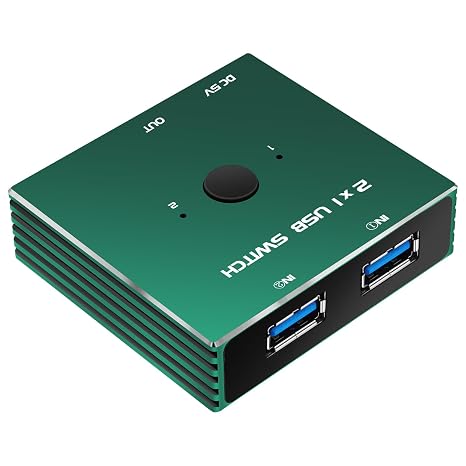
USB 3.0 Switcher 2 in 1 Out USB kvm Switch 2 Computers USB 3.1 Switcher 2 in 1 Out
89% der Befragten würden dies einem Freund empfehlen
Artikelnr.:
151059861
€ 454
Price Details
Ohne Versand- und Zollkosten ( Versand- und Zollkosten werden an der Kasse berechnet )
*Alle Artikel werden aus USA importiert
0 ratings
Schreiben Sie eine Bewertung
Auf Lager
 Vom USA Store für Sie importiert
QTY:
Bestellen Sie jetzt und erhalten Sie es am Donnerstag, September 24
Gesicherte Transaktion
Ubuy ist bestrebt, Ihre Sicherheit und Privatsphäre zu schützen. Unser fortschrittliches Zahlungssicherheitssystem gewährleistet Vertraulichkeit, indem Ihre Daten während der Übertragung mit AES (Advanced Encryption Standards) und SSL (Secure Socket Layer) Protokollen verschlüsselt werden. Ihre Zahlungsdaten sind 100% sicher, da wir Ihre Zahlungsdaten nicht an Drittanbieter weitergeben.
Unsere besten Logistigpartner


Effortlessly share your keyboard, mouse, printer, and more between two computers with a single click.

Fast
Shipping

Kostenlose
Rücksendung*

Sichere Verpackung

100 % Originalprodukte

PCI DSS-Standards

ISO 27001-zertifiziert





Note: Step Down Voltage Transformer required for using electronics products of USA store (110-120). Recommended power converters Jetzt kaufen.


Besondere Merkmale
Dual Computer Access
Effortlessly switch between two computers using a single USB connection, streamlining your workspace and enhancing productivity without multiple cables.
High-Speed Data Transfer
Supports USB 3.0 and 3.1 standards, allowing for fast data transfer rates up to 5Gbps, making file exchanges quick and efficient.
User-Friendly Interface
Designed with a simple push-button switching mechanism, making operation hassle-free while ensuring seamless connectivity without the need for additional software.
Produktdetails
| Operation Mode | ON-OFF-ON |
| Current Rating | 1000 milliamps |
| Operating Voltage | 5 volts |
| Contact Type | Normally Open |
| Connector Type | Hdmi, Usb |
| Switch Type | Push Button |
| Terminal | Usb |
| Circuit Type | 2-way |
| Mounting Type | Surface Mount |
| Actuator Type | Push Button |
| Number of Positions | 1 |
| Upper Temperature Rating | 60 u00b0C |
| Control Method | Touch |
| Connectivity Protocol | USB |
| Color | Green |
| Item Dimensions | 1 x 1 x 1 inches (2.5 x 2.5 x 2.5 cm) |
| Unit Count | 1 Count |
| Number of Items | 1 |
| Material Type | Aluminum |
| Contact Material | Aluminum |
| International Protection Rating | IP00 |
| Specification Met | NOM |
| Brand Name | GiantMatrix |
| Model | GMHOTMatrix2020005 |
| Manufacturer | GiantMatrix |
| UPC | 768795649513 |
| Included Components | HDMI cable |
| Part Number | GMHOTMatrix2020005 |
| Brand | GiantMatrix |
| Material | Aluminum |
| Item dimensions L x W x H | 1 x 1 x 1 inches (2.5 x 2.5 x 2.5 cm) |
Für wen ist das Produkt geeignet?

-
Home Office Users
Ideal for users managing two computers at home, facilitating easy switching between devices for productivity.
-
Gaming Enthusiasts
Perfect for gamers who want to switch between gaming consoles and PCs, maintaining high-speed connectivity.
-
Small Businesses
Suitable for small offices needing a compact solution to manage multiple computers on a single monitor.

-
Heavy Data Users
Not ideal for users transferring large files simultaneously, as data speeds may be affected during switching.
PRODUKTBESCHREIBUNG
USB 3.0 Switcher 2 in 1 Out USB kvm Switch 2 Computers USB 3.1 Switcher 2 in 1 Out
Haben Sie eine Frage? Mit uns chatten
Kundenfragen und -antworten
-
Frage:
What is a USB 3.0 Switcher 2 In 1 Out USB KVM Switch?
Antworten: A USB 3.0 Switcher 2 In 1 Out USB KVM Switch allows you to control two computers using a single set of keyboard, video, and mouse (KVM). This type of switch is designed to facilitate seamless switching between two systems, enhancing productivity in both home and office environments. Users can benefit from reduced workspace clutter, as it eliminates the need for multiple peripherals. A typical scenario is when you want to work on your personal and work computer simultaneously without the hassle of constantly plugging and unplugging devices. -
Frage:
How does a KVM switch improve workflow?
Antworten: A KVM switch can significantly streamline your workflow by enabling you to switch between multiple computers with the press of a button. This makes multitasking easier, especially if you frequently need to access files, applications, or data from both systems. In practical use, a graphic designer may switch between a design computer and a testing machine, efficiently managing tasks without the interruption of constantly switching cables. This fosters an uninterrupted work rhythm, allowing for greater focus and less time wasted. -
Frage:
Is the USB 3.0 Switcher compatible with all devices?
Antworten: The USB 3.0 Switcher is designed to be compatible with a wide range of devices, particularly those that support USB 3.0 and USB 3.1 technology. This includes laptops, desktops, and peripheral devices like printers and storage drives. However, ensuring compatibility largely depends on the specific systems you are using. For instance, if you have a high-performance gaming PC and a regular office computer, this switch will facilitate smooth data transfer between them, allowing you to utilize peripherals across both without issues. -
Frage:
What cables do I need to use with the USB KVM switch?
Antworten: To use a USB KVM switch effectively, you generally need video cables (like HDMI or DisplayPort, depending on your setup) and USB cables to connect the computers to the switch. Each computer will need its respective cables leading to the KVM unit. It's advisable to choose high-quality cables to ensure maximum data transfer speeds and clear video output. For example, connecting a high-resolution monitor to the switch alongside your keyboard and mouse allows for optimal usage when switching between systems. -
Frage:
Can you use this KVM switch with different operating systems?
Antworten: Yes, the USB 3.0 Switcher 2 In 1 Out is compatible with multiple operating systems, including Windows, macOS, and Linux. This versatility makes it ideal for users who work with diverse systems. For instance, a developer might use one computer for Windows programming while testing applications on a Linux machine. The ability to switch between operating systems enhances user experience, allowing them to integrate various technologies into their workflow effectively. -
Frage:
What are the advantages of USB 3.1 over USB 3.0 in a KVM switch?
Antworten: USB 3.1 offers improved data transfer speeds and enhanced power delivery compared to USB 3.0. This means that when using a KVM switch equipped with USB 3.1, peripherals can operate at higher performance levels. For instance, if you're using an external hard drive, a USB 3.1 switch can significantly reduce the time it takes to transfer large files between computers. Users in creative industries, such as video editing or graphic design, will especially appreciate the speed boost for transferring large data sets or running demanding software. -
Frage:
Is it possible to switch between computers without any delay?
Antworten: Yes, many modern USB KVM switches enable switching with minimal lag. Advanced models feature technologies such as hotkey switching or remote button control, allowing users to shift between systems almost instantaneously. This is particularly beneficial in scenarios where time-sensitive tasks are involved, such as IT troubleshooting or live presentations. Users can effortlessly manage multiple systems while maintaining a continuous workflow, which is crucial in high-pressure environments. -
Frage:
What if I encounter issues while using the KVM switch?
Antworten: If you experience issues with your KVM switch, troubleshooting steps include checking connections, ensuring compatibility between devices, and verifying the required drivers are installed. Common problems include issues with video output or peripheral recognition. For instance, if your mouse isn't working after switching, make sure all USB connections are secure. Additionally, users can consult the manufacturer's manual or their website for detailed troubleshooting steps, often leading to quick resolutions. -
Frage:
Where can I buy the USB 3.0 Switcher 2 In 1 Out USB KVM Switch in Austria?
Antworten: You can buy the USB 3.0 Switcher 2 In 1 Out USB KVM Switch from Ubuy in Austria. Ubuy offers a diverse selection of electronic products, ensuring you can find the specific switch that meets your needs. With Ubuy, you can enjoy a convenient shopping experience tailored to your preferences, and you're likely to find various options that cater to your KVM switch specifications.
GiantMatrix KVM Switches Editorial Review
USB 3.0 Switcher 2 in 1 Out USB kvm Switch 2 Computers USB 3.1 Switcher 2 in 1 Out offers a straightforward solution for easily sharing USB peripherals between two computers. Its compact aluminum design is not only stylish but robust, enhancing the user experience with features like a push button for switching and blue LED indicators to identify active connections. Although primarily a USB switch without video switching capabilities, many users find it effective for various applications, such as sharing a keyboard and mouse or switching between backup devices, thanks to its simple operation and quality build. Most reviewers appreciate its ease of use and quality construction, reinforcing its practicality for standard USB sharing needs.
Kundenbewertungen
1 Kundenbewertungen
-
5 Sterne
0%
-
4 Sterne
100%
-
3 Sterne
0%
-
2 Sterne
0%
-
1 Sterne
0%
Bewerten Sie dieses Produkt
Teilen Sie Ihre Meinung mit anderen Kunden
Vorteile
- Compact and stylish aluminum design
- Simple push-button operation
- Blue LED indicators for easy tracking
- Supports USB 3.0 speeds
- Sturdy build quality and materials
Nachteile
- May not function as a true KVM switch for video
Platform Trust & Buyer Confidence

JK
Jasmin
Verified buyer
“Great products and very good service: very easy and very fast international delivery.”
9 September 2026 · via Trustpilot
AG
Anke
Verified buyer
“Wonderful online shopping experience, smooth transaction from the start. Payment method works conveniently and delivery is unexpectedly fast and reliable. You go the extra mile for service. What makes this even more amazing, you deliver to Namibia. I will remain a happy Ubuy customer and will increase my purchases for sure! Thank you!”
10 September 2026 · via Trustpilot
H
Hazel
Verified buyer
“Very easy to find the products what you need, and so fast delivery, that’s why I highly recommended to others costumers to used ubuy.”
10 September 2026 · via Trustpilot
O
Opaleye
Verified buyer
“I received exactly what I ordered I was skeptical about your site because that was my first time to order. But the order came timely and neatly packaged. I was not disappointed. Thank you.”
11 September 2026 · via Trustpilot
AC
Adele
Verified buyer
“Easy to find and order what you want on the website. Delivery is quick to the UK”
8 September 2026 · via Trustpilot
Sicheres Bezahlen
Global Delivery
Einfache Rückgabe
Genuine Products
Produktpreisverlauf
Wichtige Information
- Einschränkungen: Für international versandte Produkte beachten Sie bitte, dass jegliche Herstellergarantie nicht gültig sein könnte; Herstellerservice-Optionen nicht verfügbar sein könnten; Produkthandbücher, Gebrauchsanleitungen und Sicherheitshinweise nicht in der Sprache des Ziellandes verfasst sein könnten; die Produkte (und Begleitmaterialien) könnten nicht im Einklang mit den Standards, Spezifizierungen und Etikettierungsvorgaben des Ziellandes entworfen sein; und die Produkte könnten nicht der Voltzahl und anderen elektrischen Standards des Ziellandes entsprechen (weshalb, falls zutreffend, die Verwendung eines Adapters oder Umwandlers erforderlich sein könnte). Der Empfänger ist dafür verantwortlich sicherzustellen, dass das Produkt legal in das Zielland importiert werden kann. Bei der Bestellung von Ubuy oder seinen Partnern ist der Empfänger der eingetragene Importeur und muss sich an alle Gesetze und Regulierungen des Ziellandes halten.
- Nicht alle auf Ubuy aufgeführten Produkte werden zum Verkauf angeboten, da Ubuy eine globale Suchmaschine ist. Produkte unterliegen Export-/Handelsbestimmungen.
€ 454
Bestellen Sie jetzt und erhalten Sie es am Donnerstag, September 24
Dieser Artikel unterliegt in meinem Land keinen Beschränkungen. (Klicken Sie bitte auf den obigen Link, wenn dieser Artikel in Ihrem Land keinen Beschränkungen unterliegt. Unser Team wird ihn dann prüfen und zulassen.)
QTY:
Gesicherte Transaktion
PCI DSS compliant and ISO 27001:2022 certified, with encrypted payments and full buyer protection on every order.
Unsere besten Logistigpartner
Schnellste grenzüberschreitende Lieferung
Merkmale und Vorteile
- Easily switch between two computers with one click.
- LED indicators show which device is currently active.
- Supports high-speed USB 3.0 data transfer at up to 5Gbps.
- Great compatibility with various operating systems, including Windows and Mac.
- Ideal for sharing keyboards, mice, printers, and other USB devices.
- Streamlines your workspace, reducing clutter and enhancing productivity.
Ubuy Assurance
Experience worry-free shopping with 100% original products, PCI DSS-compliant payment security, ISO 27001-certified data protection, the fastest cross-border delivery, free returns *, and secure packaging on every order.