- Startseite /
- Büroprodukte /
- Büroelektronik /
- Printers & Accessories /
- Computer Printers /
- Tintenstrahl-Computerdrucker /
- Ink Tank Printers /
- Epson Workforce WF-3620 WiFi Direct All-in-On...
0 ratings


Artikelnr.:
217188
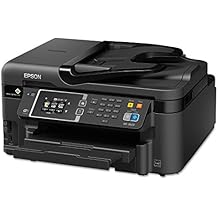
Epson Workforce WF-3620 WiFi Direct All-in-One Color Inkjet Printer, Copier, Scanner, Amazon Dash Replenishment Ready
Artikelnr.:
217188
€ 462
Price Details
Excluding Shipping & Custom charges ( Shipping and custom charges will be calculated on checkout )
*All items will import from USA
0 ratings
Schreiben Sie eine Bewertung
Auf Lager
 Vom USA Store für Sie importiert
QTY:
Bestellen Sie jetzt und erhalten Sie es am Donnerstag, Juli 02
Gesicherte Transaktion
Ubuy ist bestrebt, Ihre Sicherheit und Privatsphäre zu schützen. Unser fortschrittliches Zahlungssicherheitssystem gewährleistet Vertraulichkeit, indem Ihre Daten während der Übertragung mit AES (Advanced Encryption Standards) und SSL (Secure Socket Layer) Protokollen verschlüsselt werden. Ihre Zahlungsdaten sind 100% sicher, da wir Ihre Zahlungsdaten nicht an Drittanbieter weitergeben.
Unsere besten Logistigpartner


Get Performance Beyond Laser with the WorkForce WF-3620, powered by Precision Core

Fast
Shipping

Kostenlose
Rücksendung*

Sichere Verpackung

100 % Originalprodukte

PCI DSS-Standards

ISO 27001-zertifiziert


Note: Step Down Voltage Transformer required for using electronics products of USA store (110-120). Recommended power converters Jetzt kaufen.


Besondere Merkmale
All-in-One Functionality
Combines printing, scanning, and copying in one compact device, allowing users to save space and streamline their work processes, making it perfect for home offices and small businesses.
WiFi Direct Connectivity
Enables direct wireless printing from devices without the need for a router, enhancing convenience and accessibility for users who want efficient mobile printing solutions.
Amazon Dash Ready
Automatically reorders ink supplies when running low, ensuring uninterrupted printing and eliminating the hassle of manually tracking inventory, perfect for busy professionals.
Produktdetails
| Item Weight | 20.3 lbs (9.21 kg) |
Für wen ist das Produkt geeignet?

-
Small Business Owners
Ideal for small businesses needing fast printing, scanning, and copying capabilities without sacrificing quality or convenience.
-
Home Office Users
Perfect for remote workers who require an efficient all-in-one printer for everyday printing, scanning, and copying tasks.
-
Budget-Conscious Consumers
Great for users looking for an affordable printer with multiple functionalities and cost-effective ink management features.

-
High Volume Users
Not suitable for users with extremely high print volumes requiring faster speeds and heavier-duty printing capabilities.
-
Photo Printing Enthusiasts
May not meet the high standards for color accuracy and detail demanded by professional photographers or artists.
-
Mobile-Only Users
Not ideal for users who only print from mobile devices, as direct PC connectivity may be limited or cumbersome.
PRODUKTBESCHREIBUNG
Epson Workforce WF-3620 WiFi Direct All-in-One Color Inkjet Printer, Copier, Scanner, Amazon Dash Replenishment Ready
Haben Sie eine Frage? Mit uns chatten
Kunden Fragen und Antworten
-
Frage:
What features does the Epson WorkForce WF-3620 offer?
Antworten: The Epson WorkForce WF-3620 is a versatile all-in-one printer that combines printing, scanning, and copying functions, with WiFi Direct connectivity for easy mobile printing. It supports automatic duplex printing to help save paper and features a high-capacity paper tray. This printer is designed for small offices and home use, offering vibrant color printing and fast print speeds, making it perfect for a diverse array of printing tasks such as reports, presentations, and everyday documents. -
Frage:
How does the WiFi Direct feature work on the WF-3620?
Antworten: WiFi Direct allows you to connect your devices directly to the printer without needing a wireless router. This is beneficial in smaller environments or when the network is down. Simply enable WiFi Direct on the printer and connect your smartphone, tablet, or laptop directly to it to print documents or photos seamlessly and wirelessly. -
Frage:
Can I use the Epson WorkForce WF-3620 for photo printing?
Antworten: Yes, the Epson WorkForce WF-3620 is well-suited for photo printing, thanks to its color inkjet technology. It can produce high-quality photos with accurate colors and sharp details, making it ideal for printing everything from family photos to professional portfolios. Utilize specialized photo paper for even more impressive results, and take advantage of its wireless capabilities to print directly from your mobile devices. -
Frage:
What types of paper can the WF-3620 handle?
Antworten: The WF-3620 accommodates various paper types, including plain paper, photo paper, matte paper, and envelopes. With adjustable paper trays, users can easily switch between different media types, making it versatile for both professional documents and creative projects. This flexibility allows you to handle everything from simple documents to vibrant prints, meeting various printing needs. -
Frage:
Is the WF-3620 compatible with mobile printing apps?
Antworten: Absolutely! The Epson WorkForce WF-3620 is compatible with several mobile printing protocols, such as Apple AirPrint, Google Cloud Print, and the Epson iPrint app. This allows you to print directly from your smartphones or tablets with ease, whether at home or in the office. Utilising these apps provides convenience, allowing for quick access to printing without needing to transfer files to a computer. -
Frage:
What is the print speed of the WF-3620?
Antworten: The Epson WorkForce WF-3620 is capable of printing up to 19 pages per minute for black and white documents and around 10 pages per minute for color prints. This makes it an efficient choice for busy environments where time is of the essence. You'll be able to print quick batches of documents or colorful reports without significant delays, enhancing productivity. -
Frage:
Can the WF-3620 print double-sided documents automatically?
Antworten: Yes, the WF-3620 features automatic duplex printing, allowing it to print on both sides of a sheet without manual intervention. This not only saves time but also reduces paper consumption, making it an environmentally friendly option for users looking to minimize waste. It's ideal for printing booklets, reports, or any multi-page documents. -
Frage:
Where can I purchase the Epson WorkForce WF-3620 in Austria?
Antworten: You can buy the Epson WorkForce WF-3620 at Ubuy in Austria. Ubuy offers a wide selection of electronics and provides a seamless shopping experience, making it easy to find the printer that meets your needs. With Ubuy, you can also take advantage of various payment options and check for any current promotions.
Epson Ink Tank Printers Editorial Review
The Epson WorkForce WF-3620 offers good resolution for printing and a high-quality scanner. It has the ability to perform duplex scanning and printing. The printer has a fast boot time of about 20 seconds and an automatic power-saving function. However, the printer has a terrible ink situation which is common for consumer printers. Customers have reported spending a lot of time and money trying to fix it. Some customers have also mentioned that the printer does not print as well as other printers they have used like the Canon Pixma printer. Despite these shortcomings, customers like that the printer is small, compact, and easy to set up. It is also able to perform various tasks besides printing. Key
Kundenbewertungen
1 Kundenbewertungen
-
5 Sterne
100%
-
4 Sterne
0%
-
3 Sterne
0%
-
2 Sterne
0%
-
1 Sterne
0%
Bewerten Sie dieses Produkt
Teilen Sie Ihre Meinung mit anderen Kunden
Vorteile
- Good print resolution
- High-quality scanner
- Duplex scanning and printing
- Fast boot time and automatic power-saving function
- Small and compact
- Easy to set up Key
Nachteile
- Terrible ink situation
Produktpreisverlauf
Wichtige Information
- Einschränkungen: Für international versandte Produkte beachten Sie bitte, dass jegliche Herstellergarantie nicht gültig sein könnte; Herstellerservice-Optionen nicht verfügbar sein könnten; Produkthandbücher, Gebrauchsanleitungen und Sicherheitshinweise nicht in der Sprache des Ziellandes verfasst sein könnten; die Produkte (und Begleitmaterialien) könnten nicht im Einklang mit den Standards, Spezifizierungen und Etikettierungsvorgaben des Ziellandes entworfen sein; und die Produkte könnten nicht der Voltzahl und anderen elektrischen Standards des Ziellandes entsprechen (weshalb, falls zutreffend, die Verwendung eines Adapters oder Umwandlers erforderlich sein könnte). Der Empfänger ist dafür verantwortlich sicherzustellen, dass das Produkt legal in das Zielland importiert werden kann. Bei der Bestellung von Ubuy oder seinen Partnern ist der Empfänger der eingetragene Importeur und muss sich an alle Gesetze und Regulierungen des Ziellandes halten.
- Nicht alle auf Ubuy aufgeführten Produkte werden zum Verkauf angeboten, da Ubuy eine globale Suchmaschine ist. Produkte unterliegen Export-/Handelsbestimmungen.
€ 462
Bestellen Sie jetzt und erhalten Sie es am Donnerstag, Juli 02
Dieser Artikel unterliegt in meinem Land keinen Beschränkungen. (Klicken Sie bitte auf den obigen Link, wenn dieser Artikel in Ihrem Land keinen Beschränkungen unterliegt. Unser Team wird ihn dann prüfen und zulassen.)
QTY:
Gesicherte Transaktion
Ubuy ist bestrebt, Ihre Sicherheit und Privatsphäre zu schützen. Unser fortschrittliches Zahlungssicherheitssystem gewährleistet Vertraulichkeit, indem Ihre Daten während der Übertragung mit AES (Advanced Encryption Standards) und SSL (Secure Socket Layer) Protokollen verschlüsselt werden. Ihre Zahlungsdaten sind 100% sicher, da wir Ihre Zahlungsdaten nicht an Drittanbieter weitergeben.
Unsere besten Logistigpartner
Schnellste grenzüberschreitende Lieferung
Merkmale und Vorteile
- Print-shop quality
- up to 40% lower printing cost vs. color laser
- Fast printing at speeds of 19 ISO ppm (black) and 10 ISO ppm (color)
- Smudge, fade, and water-resistant prints
- Auto 2-sided print, copy, scan and fax
- Includes wireless and Wi-Fi Direct