- Home Page /
- Office Products /
- Office Electronics /
- Presentation Products /
- Presentation Remotes /
- QUI Presentation Clicker with Volume Control,...
0 ratings




Item #:
219661182
QUI Presentation Clicker with Volume Control, 2.4GHz USB Wireless Presenter Remote, PowerPoint Clicker Slide Advancer Compatible with Mac, Windows,
Item #:
219661182
€ 16
Price Details
Excluding Shipping & Custom charges ( Shipping and custom charges will be calculated on checkout )
*All items will import from US
In stock
 Imported from USA store
QTY:
Order now and get it around Wednesday, June 24
Secured transaction
Ubuy works hard to protect your security and privacy. Our advanced payment security system ensures confidentiality by encrypting your information during transmission using AES (Advanced Encryption Standards) and SSL (Secure Socket Layer) protocols. Your payment details are 100% secure as we do not share your payment details with third party sellers.
Our Top Logistics Partners


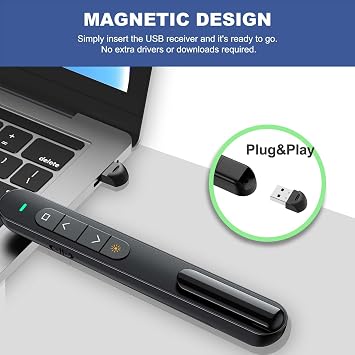
Experience seamless presentations with our intuitive plug & play presentation clicker featuring up to 328 feet of wireless range!

Fast
Shipping

Free
Return*

Secure Packaging

100% Original Products

PCI DSS Compliance

ISO 27001 Certified


Note: Step Down Voltage Transformer required for using electronics products of US store (110-120). Recommended power converters Buy Now.


What Stands Out
Wireless Convenience
Enjoy hassle-free presentations with a 2.4GHz USB wireless connection, allowing seamless slide transitions from up to 30 feet away, ideal for both Mac and Windows users.
Built-in Volume Control
Stay in control of your presentation's audio with an integrated volume control feature, eliminating the need for multiple devices and enhancing speaker performance.
User-Friendly Design
Designed for ease of use, this presenter clicker features intuitive buttons, ensuring smooth navigation and empowering you to focus on delivering a captivating presentation.
Product Details
- 【PLUG & PLAY】This presentation clicker supports page up/down, hyperlink navigation, volume control, power on/off, and full screen/black screen switching. No software or driver is required, just plug the USB receiver into your computer's USB port and you're ready to start the show (Requires one AAA battery, not included)
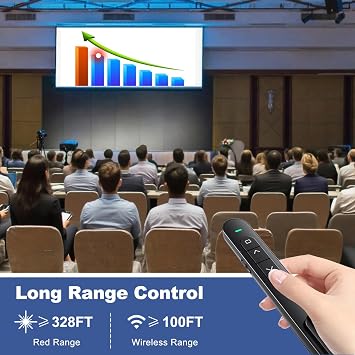
- 【BRIGHT RED POINTER LIGHT】This powerpoint clicker emits a bright red light that helps you clearly mark key parts of each slide so your audience can easily follow your main points. It remains clearly visible even in large conference rooms or lecture halls
- 【328FT LONG WIRELESS RANGE】This clicker for PowerPoint presentations delivers a control distance of up to 328 ft, allowing you to roam the entire hall and interact directly with your audience. Step away from the limits of a stationary podium to deliver a more dynamic presentation
- 【BROAD COMPATIBILITY】This wireless presenter remote works smoothly across different systems and software, compatible with Mac OS and Windows laptops. It supports software such as PowerPoint, Keynote, Google Slides, Excel, ACDSee, and Prezi
- 【PORTABLE SLIDE CLICKER】This presentation pointer includes a convenient clip that attaches to a notebook or pocket for easy carrying. It is a helpful tool for meetings, classrooms, training sessions, and presentations, and it is also suitable for sharing with colleagues and friends
| Additional Features | Ergonomic |
| Maximum Number of Supported Devices | 1 |
| Compatible Devices | Presenter remote for MS Word, Excel, PowerPoint, ACD See, iWork (Keynote & Numbers & Pages) Google Slide, Presentation clicker for Mac, Windows Linux, Android, Presentation remote for laptops, presentation electronic whiteboards, projectors |
| Connectivity Technology | USB |
| Button Quantity | 6 |
| Controller Type | Button Control |
| Maximum Range | 328 Feet |
| Number of Batteries | 1 AAA batteries required. |
| Battery Type | AAA |
| Smart Home Compatibility | Not Smart Home Compatible |
| Color | Black |
| Item Weight | 24 Grams |
| Brand | QUI |
| Model Name | Wireless Presenter |
| Model Number | BK600 |
| UPC | 765071611066 |
| Mfr Part Number | BK600 |
| Unit Count | 1.0 Count |
| Manufacturer | QUI Technology Co., Ltd. |
| Item Type Name | BK600 |
| Special Feature | Ergonomic |
| Max Number of Supported Devices | 1 |
| Compatible Devices | Presenter remote for MS Word, Excel, PowerPoint, ACD See, iWork (Keynote & Numbers & Pages) Google Slide, Presentation clicker for Mac, Windows Linux, Android, Presentation remote for laptops, presentation electronic whiteboards, projectors See more |
Who Should Buy?

-
Teachers
Ideal for educators who need an effective tool to control slide presentations while interacting with students.
-
Business Professionals
Perfect for corporate presenters who require smooth transitions and volume control during important presentations.
-
Students
Beneficial for students delivering presentations, allowing them to focus on their content instead of their technology.

-
Casual Users
May not suit individuals who rarely present, as it could be an unnecessary investment.
-
Small Screen Users
Not ideal for those presenting on devices with small screens, as visibility of slides might be compromised.
-
Large Events
Less effective in very large venues where signal and volume control may be insufficient for larger audiences.
Product Description
Have any Query? Chat with us
Customer Questions & Answers
-
Question:
What is the range of the QUI Presentation Clicker?
Answer: The QUI Presentation Clicker operates on RF 2.4GHz technology, providing a reliable range of up to 100 feet. This allows presenters to move freely around the room without the need to stay tethered to their laptop or projector. Such a range is particularly beneficial during large presentations or training sessions where you want to interact with your audience without constraints. -
Question:
Does the QUI Presentation Clicker work with Mac computers?
Answer: Yes, the QUI Presentation Clicker is fully compatible with Mac computers. Designed to seamlessly integrate with PowerPoint and other presentation software, it enables easy slide navigation. If you’re a Mac user, this clicker will enhance your presentation experience by allowing you to control slides smoothly without any technical hiccups. -
Question:
How do you set up the QUI Presentation Clicker?
Answer: Setting up the QUI Presentation Clicker is quick and straightforward. Simply plug the USB receiver into your computer's USB port, and it automatically connects to the device. Once connected, you can start your presentation without any additional software installation. This plug-and-play feature ensures that you can transition smoothly from setup to delivery in a matter of moments. -
Question:
Can I control the volume with the QUI Presentation Clicker?
Answer: Absolutely! The QUI Presentation Clicker includes dedicated volume control buttons, allowing you to adjust the sound levels directly during your presentation. This feature is particularly useful if you're presenting multimedia content or videos, enabling you to maintain audience engagement without needing to reach for your computer each time. -
Question:
Is the QUI Presentation Clicker portable?
Answer: Yes, the QUI Presentation Clicker is designed with portability in mind. Its compact size allows it to fit easily in your pocket or bag, making it an ideal companion for business trips, conferences, or classroom settings. This portability ensures that you can deliver impactful presentations anytime and anywhere, enhancing your flexibility as a presenter. -
Question:
What types of presentations is the QUI Presentation Clicker suitable for?
Answer: The QUI Presentation Clicker is versatile and suitable for various types of presentations, including business meetings, classroom lectures, and seminars. Its functionality extends to different software programs beyond PowerPoint, making it a great tool for educators, corporate trainers, and speakers alike who want to deliver presentations effectively. -
Question:
Does the QUI Presentation Clicker require batteries?
Answer: No, the QUI Presentation Clicker is designed for convenience without the hassle of batteries. It connects via a USB-C interface, drawing power directly from your computer. This eliminates the need for external batteries, ensuring you can focus solely on your presentation without worrying about power levels. -
Question:
What happens if the USB receiver gets lost?
Answer: If the USB receiver is lost, the QUI Presentation Clicker won't function without it, as the receiver is essential for the wireless connection between the clicker and your device. It’s advisable to keep the receiver in a designated slot in your laptop bag or the clicker itself so that you always have it on hand during presentations. -
Question:
How does the QUI Presentation Clicker enhance audience engagement?
Answer: The QUI Presentation Clicker allows you to move freely and interact with your audience rather than being anchored to a podium or desk. This mobility can enhance audience engagement by fostering a more dynamic and interactive presentation. Being able to walk among your audience while navigating slides creates a more personal and connected experience for everyone. -
Question:
Where can I buy the QUI Presentation Clicker?
Answer: You can buy the QUI Presentation Clicker from Ubuy in Austria. Ubuy offers a user-friendly shopping experience, ensuring you have access to this essential presentation tool efficiently. It’s a trusted platform that provides various other tech accessories, making it your go-to place for quality products.
QUI Presentation Remotes BK600 Editorial Review


The QUI Presentation Clicker has garnered a positive reception among users, particularly those in educational settings. Customers appreciate its practical design and ease of use, making it a convenient tool for seamlessly advancing slides during presentations. Many users have noted its impressive signal range, allowing operation from distances of up to 10 feet, which enhances flexibility and engagement during lessons. Despite some critiques of its ergonomics, the clicker's functionality shines through as it includes essential features like a laser pointer and volume control, making it a versatile choice for teachers and presenters alike. Users have reported that it is reliable, often plug-and-play, and has a commendable battery life. Some long-term users have experienced minor connectivity issues over time, but these have generally been resolved quickly by reconnecting the USB receiver. Overall, the QUI Presentation Clicker offers great value for its price, making it a favored option for those needing a reliable presentation tool. Its compact size, strong functionality, and Consistent performance have earned it a loyal user base, particularly among educators seeking to enhance their presentation capabilities. ###
Customer Reviews & Ratings
2813 customers ratings
-
5 Star
75%
-
4 Star
11%
-
3 Star
5%
-
2 Star
3%
-
1 Star
6%
Review this product
Share your thoughts with other customers
Pros
- Easy to use and set up
- Compact and portable design
- Strong signal range (up to 10 feet)
- Includes laser pointer and volume control
- Reliable connection with plug-and-play functionality
- Good battery life ###
Cons
- Not the most ergonomic design
Product Price History
Important information
- Limitations : For products shipped internationally, please note that any manufacturer warranty may not be valid; manufacturer service options may not be available; product manuals, instructions, and safety warnings may not be in destination country languages; the products (and accompanying materials) may not be designed in accordance with destination country standards, specifications, and labeling requirements; and the products may not conform to destination country voltage and other electrical standards (requiring use of an adapter or converter if appropriate). The recipient is responsible for assuring that the product can be lawfully imported to the destination country. When ordering from Ubuy or its affiliates, the recipient is the importer of record and must comply with all laws and regulations of the destination country.
- Not all the products listed on Ubuy are for sale, as Ubuy is a global search engine. Products are subject to export/trade regulations.
€ 16
Order now and get it around Wednesday, June 24
This item is not restrict in my country.(Please click on above link if this item is not restrict in your country, So our team will review and allow.)
QTY:
Secured transaction
Ubuy works hard to protect your security and privacy. Our advanced payment security system ensures confidentiality by encrypting your information during transmission using AES (Advanced Encryption Standards) and SSL (Secure Socket Layer) protocols. Your payment details are 100% secure as we do not share your payment details with third party sellers.
Our Top Logistics Partners
Fastest cross-border delivery
Features & Benefits
- Intuitive plug & play design; no software required.
- Control up to 328 feet away for interactive presentations.
- Bright red light to highlight key points effectively.
- Compatible with various operating systems and software.
- Portable design with a clip for easy carrying.
- Perfect for meetings, training, and dynamic presentations.